
Most pool vacuuming is simple, hook up the hose, leave the filter setting alone, and let the system do its job. But every once in a while, your pool throws something at you that the normal setting can’t handle. Heavy algae after a hot spell. Cloudy water that won’t clear no matter how long you run the filter. A flocculant treatment that’s clumped debris on the floor. That’s exactly when you need to know how to vacuum your pool to waste, a setting that most San Antonio homeowners have heard of but few actually understand when and how to use correctly.
Get this wrong and you either waste a lot of water unnecessarily, or you push a serious algae problem straight into your filter where it causes a much bigger headache than the one you started with.
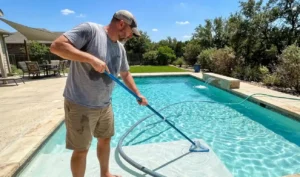
What “vacuum to waste” actually means and when you need it
The difference between filter setting and waste setting
When you vacuum a pool normally, your multiport valve is set to “Filter”, water gets pulled up through the vacuum hose, passes through your filter media (sand, cartridge, or DE), gets cleaned, and returns to the pool. That’s the right approach for routine, light debris removal. It’s efficient, it doesn’t waste water, and it’s what 90% of your vacuuming sessions should look like.
The “Waste” setting works completely differently. According to Swim University’s pool vacuum guide, when your pool is heavily dirty, you should “put the filter on the ‘Waste’ setting (not ‘Backwash’) to bypass the filter when vacuuming.” Instead of cycling water through your filter media, the Waste setting sends everything you vacuum up (water and all) straight out of the system entirely, typically through a designated drain line. Nothing gets filtered. Nothing returns to the pool. It just leaves.
This matters because of what it prevents. If you’re dealing with a heavy algae bloom and you vacuum it on the normal Filter setting, you’re pushing all that algae directly into your filter media. A sand or DE filter can get overwhelmed fast, clogging to the point where it stops filtering effectively and needs an emergency backwash mid-job. Cartridge filters can get coated to the point of needing immediate cleaning. Either way, you’ve just turned one cleanup task into two.
The specific situations where you actually need this setting
You don’t need the Waste setting for routine weekly vacuuming, that’s what the Filter setting is for, and using Waste unnecessarily just wastes water you don’t need to lose. But there are specific scenarios in San Antonio pools where switching over genuinely matters:
- Heavy algae removal. This is the most common reason San Antonio pool owners need to vacuum pool to waste. After a green pool recovery (following shock treatment and brushing) there’s often a layer of dead algae settled on the floor. Vacuuming that directly to filter risks pushing organic material through your media and right back into supposedly clean water.
- Cloudy water from flocculant treatment. According to Swim University’s flocculant guide, when using a flocculant to clear severely cloudy water, “you’ll need to vacuum on the ‘waste’ setting and bypass the filter” once the particles clump together on the pool floor, a standard pool clarifier doesn’t require this, but flocculant specifically does because the clumps are too fine and numerous for your filter to handle without clogging.
- Post-storm sediment. San Antonio’s spring storms can dump significant fine soil, caliche dust, and organic debris onto a pool floor in a single event. When that sediment layer is thick, vacuuming to waste removes it completely rather than recirculating fine particles that just re-cloud the water on the next filter cycle.
- Initial cleanup of a severely neglected pool. If you’re opening a pool that’s been ignored for months (heavy debris, significant algae, visible sediment) starting with a vacuum-to-waste pass before doing anything else prevents your filter from being overwhelmed right out of the gate.
How to do it correctly and what to expect afterward
The step-by-step process
Setting up to vacuum your pool to waste isn’t complicated, but a few steps matter for doing it correctly and avoiding common mistakes.
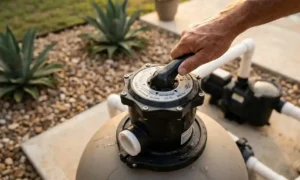
First, locate your multiport valve and turn the pump off before changing the setting (never switch a multiport valve while the pump is running, as this can damage the valve. Turn the dial to “Waste”) confirm it’s specifically labeled Waste, not Backwash, since those are different functions entirely. According to Swim University’s multiport valve guide, “the Waste setting allows water to enter the filter, but bypass the filter media, and be sent completely out of the filtration system”, which is exactly the function you need for this job.
Before you start the pump back up, position a garden hose in the pool and have it ready to run continuously. This is the step most people forget, and it’s the one that matters most. Since water is leaving the system permanently rather than recirculating, your pool’s water level will drop steadily the entire time you’re vacuuming. Without active refilling, you risk your pump losing prime if the water level drops too low, which can damage the pump itself.
Vacuum methodically in a slow, overlapping grid pattern across the pool floor, the same approach you’d use for normal vacuuming, just with the awareness that this setting moves more aggressively and pulls more water. Watch your pump pressure gauge throughout, if it climbs unusually high, that typically means the hose or vacuum head has picked up debris large enough to create a partial blockage.
After you’re done, don’t skip these steps
Once you’ve finished vacuuming to waste, there are a few finishing tasks that matter just as much as the vacuuming itself. Switch the multiport valve back to “Filter” immediately, leaving it on Waste means your pool isn’t filtering at all, which is fine for a few minutes but becomes a real problem if forgotten for hours or days.
Continue running the garden hose until your water level returns to its normal mark, typically halfway up the skimmer opening for most residential pools. In San Antonio’s heat, this might take longer than you’d expect simply due to evaporation working against your refill rate, so check back periodically rather than assuming it’s done.
Test your water chemistry once refilled. Because you’ve added a meaningful volume of fresh tap water (and San Antonio tap water carries its own mineral load) your chlorine, pH, and calcium hardness readings will likely have shifted from before you started. Rebalance as needed rather than assuming your pre-vacuum chemistry still applies. According to Angi’s pool vacuuming guide, after using the waste setting, “you’ll notice the pool’s water level dropping as you work,” which is precisely why having that hose running throughout (not just at the end) keeps your pump protected the entire time.
Why this matters more in San Antonio than in other climates
San Antonio’s combination of intense heat-driven algae risk, hard water that complicates flocculant treatments slightly differently than in soft water regions, and a long season with more opportunities for heavy debris events means the vacuum to waste scenario comes up more often here than in milder climates with shorter, calmer pool seasons. Knowing how and when to use it correctly isn’t a rare skill you’ll need once, it’s a practical tool that comes in handy multiple times across a typical South Texas swim season.
That said, vacuuming to waste also means losing water, sometimes a meaningful amount, especially for a thorough whole-pool pass. In a city where water conservation matters and where refilling with San Antonio’s hard tap water has its own chemistry implications, knowing when this approach is genuinely necessary versus when standard filtering would do the job is worth getting right rather than defaulting to the more aggressive setting out of caution.
If you’ve been dealing with a recurring cloudy or algae-prone pool and aren’t sure whether your equipment is keeping up with what your pool actually needs, our comprehensive pool cleaning service in Bexar County includes the kind of deep cleaning and diagnostic visit that addresses heavy debris and algae situations professionally, without the trial and error of figuring out vacuum settings on a pool that’s already given you a headache.
And if you’re still trying to understand the broader differences between your filter and your vacuum, and when each tool is actually the right one for the job, our article on pool filter vs. vacuum differences covers that foundational comparison in more detail.
FAQs
When should I vacuum my pool to waste instead of filter?
Use the waste setting specifically for heavy algae removal after a green pool recovery, cloudy water cleanup following a flocculant treatment, significant post-storm sediment, or the initial cleanup of a severely neglected pool. For routine weekly vacuuming with normal light debris, the standard Filter setting is correct and doesn’t waste water. Vacuuming to waste bypasses your filter media entirely, sending the debris and water straight out of the system, which prevents heavy debris from overwhelming or clogging your filter, but isn’t necessary for everyday maintenance.
Will vacuuming my pool to waste lower my water level a lot?
Yes, noticeably, since water leaves the system permanently rather than recirculating through your filter, your pool’s water level drops continuously while you work. Always have a garden hose running into the pool throughout the process, not just at the end, to prevent your water level from dropping too low. If the level drops too far, your pump can lose prime and potentially suffer damage. In San Antonio’s heat, refilling can take longer than expected due to evaporation working against your refill rate, so monitor the water level periodically rather than assuming it’s back to normal.
What’s the difference between the Waste setting and the Backwash setting on my pool filter?
These are different functions and shouldn’t be confused. The Waste setting bypasses your filter media entirely while vacuuming, sending water and debris straight out of the system, used when vacuuming heavy debris or algae directly off the pool floor. The Backwash setting reverses water flow through your filter media to clean accumulated debris out of the filter itself, typically used for routine filter maintenance rather than active vacuuming. Using Backwash when you meant to use Waste won’t achieve the bypass effect you need for heavy debris removal.
Do I need to rebalance my pool chemistry after vacuuming to waste?
Yes. Vacuuming to waste removes a meaningful volume of pool water that then gets replaced with fresh tap water. In San Antonio, tap water carries its own mineral content and chemistry profile, which means your chlorine, pH, and calcium hardness readings will likely shift from where they were before you started. Test your full chemistry panel once the water level is restored and rebalance as needed rather than assuming your previous readings still apply, skipping this step is a common reason pools look cloudy again shortly after a vacuum-to-waste session.
Can I damage my pump by vacuuming my pool to waste incorrectly?
Yes, primarily through letting the water level drop too low during the process. If your pump starts drawing air instead of water because the level has dropped too far, it can lose prime and potentially suffer damage running dry. Always switch the multiport valve setting only when the pump is off, never while it’s running, since changing settings under pressure can damage the valve itself. Keep a garden hose running continuously throughout the vacuuming session and switch the valve back to Filter immediately once you’re finished to resume normal filtration.
